

Is Buying Cheap Charging Cables Safe? A 2026 Guide

Table of Contents
- Are Cheap Charging Cables Safe? What the Risks Actually Look Like
- What Cheap and Counterfeit Cables Can Do to Your Phone
- How to Spot Fake Phone Chargers and Knockoff Cables
- MFi Certified Cable Benefits and Why Certification Matters
- UK Electrical Safety Standards for Chargers: What to Check Before You Buy
- Charging-Only Versus Data-Transfer Cables: Compatibility and Data Safety
- A Practical Cable Inspection Checklist (and When to Stop Using One)
- Frequently Asked Questions
Last Updated: October 9, 2026
Are Cheap Charging Cables Safe? What the Risks Actually Look Like
Buying cheap charging cables is not automatically dangerous, but the risk rises sharply once you leave recognised brands and certified stock behind. A cable is a power and data pathway, and a poorly made one can damage a charging port, stress a battery, or overheat. This guide explains where the genuine risks sit, how to spot fake phone chargers before you plug them in, and what the Electrical Safety First guidance on counterfeit electrical goods says about the wider problem.
What a Charging Cable Actually Does
A charging cable carries electrical current and data between a power adapter and a device. Inside the outer sleeve sit thin conductors: power, ground, and data lines, each wrapped in insulation. The connector shell and internal wiring determine how much current the cable can carry safely and whether the device negotiates the correct voltage. A cable that meets its stated rating does this reliably for years; one built to a lower standard may work at first and fail later, often without warning.
Where the Real Danger Sits: Cable Versus Power Adapter
The power adapter carries more risk than the cable in most households. It connects directly to mains voltage, and a badly built one can fail in ways a cable cannot, including insulation breakdown and overheating at the plug. If you spend more on one item, spend it on the adapter.
What Cheap and Counterfeit Cables Can Do to Your Phone
Damage from a substandard cable is usually gradual rather than dramatic. The most common outcomes are a charging port that stops holding a connector firmly, a battery that charges inconsistently, and heat building up where the connector meets the phone. These failure modes tend to appear after the return window has closed.
Battery and Charging Port Damage
A charging port is a mechanical component with fine internal contacts. A connector that is out of spec, too loose, or made from soft metal wears those contacts down over repeated plugging; once damaged, the phone may only charge at certain angles, and repair often means opening the device. Batteries suffer differently: unstable current delivery causes uneven charging, which shortens usable life.
Overheating, Short Circuits and Fire Hazard
Heat is the clearest warning sign a cable gives you. A cable that becomes warm during a normal charge is telling you something about its internal wiring or connector fit. In the worst cases, damaged insulation or a short circuit inside the connector can lead to a fire hazard, particularly if left charging unattended overnight. Cables with thin insulation and poor strain relief are the ones that fail.
How to Spot Fake Phone Chargers and Knockoff Cables
Spotting a fake starts with the connector and the packaging, not the price tag. Genuine cables have firm, precisely moulded connector shells that seat with a clean click.
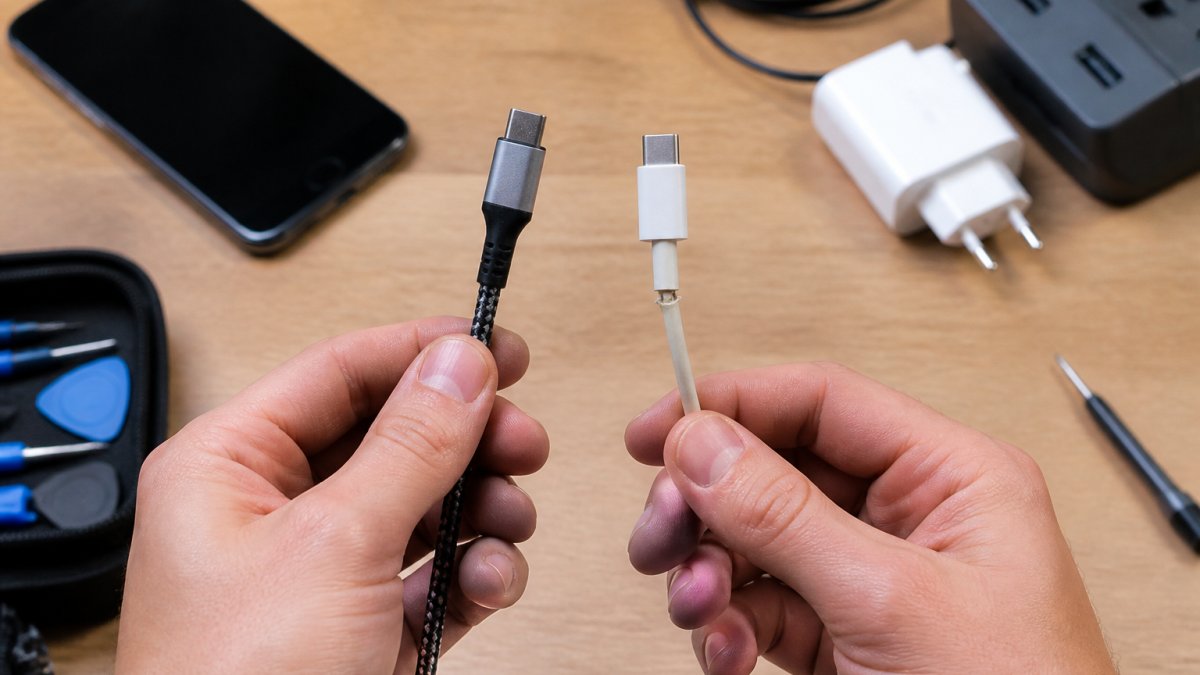
Packaging and labelling carry the rest of the story. The Intellectual Property Office guidance on counterfeit goods explains how counterfeit electrical products reach UK buyers and why they bypass the testing that legitimate stock goes through.
Why Counterfeits Bypass Testing
A legitimate cable or charger reaches the shelf only after its manufacturer has carried out conformity assessment and drawn up technical documentation. A counterfeit skips all of it: no controlled bill of materials, no insulation rated to a known temperature, no sample held back for testing. The unit may work, but nothing has been checked against a specification, so its behaviour under load, heat, or fault is unknown.
A Verification Routine You Can Run Before You Buy
Most buyers cannot test a cable at the point of sale, but they can check whether the product's claims hold together:
- Check the mark. Look for a legible UKCA marking on the product or its packaging. A mark that is blurred, hand-applied, or absent is a stop signal.
- Check the rating against the device. A cable sold as supporting 100 W fast charging should state that rating on the packaging and in the product listing. If the rating is vague or missing, assume the lower figure.
- Check the seller. A seller who lists a manufacturer name, a model number, and a UK contact address is easier to hold to account than an anonymous marketplace listing. The Office for Product Safety and Standards guidance on UKCA marking sets out what the marking covers and how to check it.
- Check the price against the specification. A cable claiming 100 W capability at a price far below the going rate for that specification is a mismatch worth questioning. Price alone proves nothing, but a large gap between claim and price is worth noticing.
- Check the return terms. A seller who will not accept a return on an electrical accessory is telling you something about how confident they are in it.
None of these checks proves a cable is genuine, but they filter out products whose claims do not survive basic questions, which is where most of the risk sits.
MFi Certified Cable Benefits and Why Certification Matters
MFi certification is Apple's licensing programme for accessories built to connect to its devices. An MFi certified cable has been tested to meet Apple's compatibility and safety requirements, so it negotiates charging correctly and will not trigger the "accessory not supported" warning uncertified Lightning cables often produce. Our own Apple USB-C to Lightning Cable - 1m is MFi certified, supports fast charging up to 96 W with a compatible adapter, and syncs data at USB 2.0 speeds.

UK Electrical Safety Standards for Chargers: What to Check Before You Buy
Electrical products sold in the UK must meet UK electrical safety standards, and legitimate chargers and cables carry the UKCA marking to show conformity. The UKCA mark replaced CE marking for most goods placed on the market here, and it is the mark to look for on the packaging or the product itself. The Office for Product Safety and Standards guidance on UKCA marking sets out what the marking covers and how to check it.
What Conformity Assessment Actually Involves
The UKCA mark is not a quality badge awarded by a regulator. For a mains charger, that typically means evidence on electrical insulation, creepage and clearance distances, temperature rise under load, and resistance to fault conditions.
Apple USB-C to Lightning Cable – 1m →
That distinction matters to a buyer. The mark tells you a manufacturer has taken on the legal obligation to meet the standard. It does not mean the unit in your hand was individually tested, and it does not guarantee the product will never fail, but it gives you a route to recourse if it does.
What Certification Does Not Guarantee
A common misunderstanding is that a certification mark means a cable is safe in every situation. It does not. Certification is tied to a specification and a set of operating conditions. A certified 30 W cable used to charge a laptop that expects 60 W is not unsafe, but it will charge slowly or not at all, and may run warmer than intended.
Matching the Rating to the Device
Before you buy, check three figures and make sure they line up:
- The adapter's output, stated in volts and amps or in watts.
- The cable's rating, stated in watts or amps. A cable rated for 60 W will not carry 100 W safely, and a cable rated for 3 A will not carry 5 A.
- The device's requirement, usually stated in the device's specifications or on the original charger.
If the cable's rating is below the adapter's output, the cable is the limiting factor and may run warm. If the adapter's output is below the device's requirement, charging will be slow but not dangerous. The safe combination is a cable rated at or above the adapter's output, and an adapter that meets or exceeds the device's requirement.
| What to Check | Genuine Product | Counterfeit or Cheap Cable |
|---|---|---|
| Certification mark | Clear UKCA marking | Missing, blurred or misprinted |
| Connector fit | Firm, clean click | Loose or wobbly |
| Cable weight | Feels dense | Unusually light |
| Labelling | Manufacturer, model, rating stated | Spelling errors, vague details |
| Heat during use | Stays cool | Warm to the touch |
| Rating match | Cable rating meets or exceeds adapter output | Rating missing or below adapter output |
Charging-Only Versus Data-Transfer Cables: Compatibility and Data Safety
Charging-only cables carry power but no data lines, which makes them cheaper to produce and fine for topping up a device. Data-transfer cables include the data conductors, so they handle syncing, backups, and file transfers as well as charging.
Compatibility is the other half of the equation. Our USB C to USB C 60W TPE Braided Black Fast Data Charging Cable supports up to 60 W and handles both charging and data, while the USB Type C to C Braided Colourful Charging Data Cable 1M 30W suits phones, tablets and lighter devices.


A Practical Cable Inspection Checklist (and When to Stop Using One)
Run this check on every cable you own, and repeat it every few months. Most failures announce themselves before they become dangerous, and a two-minute inspection catches nearly all of them.
- Check the connector shell for cracks, separation, or a bent tip
- Flex the cable near both ends and feel for a stiff or kinked section
- Confirm the cable stays cool during a full charge
Stop using a cable immediately if the insulation is broken, the connector is bent or loose, it heats up during charging, or your device only charges at certain angles. We stock replacement cables from £9.99, and a Vibe Lightning Mains Charger MFI covers the adapter side of the same problem.
Cheap charging cables are safe enough when they come from a reputable manufacturer and carry the right certification, and risky when they do not.
Frequently Asked Questions
Can cheap charging cables cause permanent battery damage?
They can shorten battery life rather than destroy it outright. A cable with thin internal wiring and poor insulation can deliver unstable voltage and current, which stresses the battery over months of charging. The bigger risk on cheap charging cables is the charging port: a loose or badly sized connector can wear the port so it stops holding any cable properly. If your phone now charges only at certain angles, the port is often the first casualty.
How do I check if a USB cable is compliant with UK electrical safety standards?
Look for the UKCA mark on the cable or its packaging, which shows the product meets the rules that apply to electrical equipment sold here. Plugs should carry the UKCA mark and a BS 1363 reference for the three-pin plug shape. A CE mark alone is no longer enough for most goods placed on the market. If the packaging has no manufacturer name, no UK importer address and no mark at all, treat it as uncertified and avoid it.
What is the difference between a data-transfer cable and a charging-only cable?
A charging-only cable carries power but has no data wires inside, so it cannot sync files. A data-transfer cable contains those extra wires and supports both charging and syncing, usually at USB 2.0 speeds of up to 480 Mbps on standard cables. Charging-only cables are cheaper to make and are common in budget multipacks. If you only ever top up your phone, either works, but you will not be able to back up photos or update your device with a charging-only cable.
How can I identify if a charging cable is MFi certified?
Check the packaging for the MFi badge and the words Made for iPhone, iPad or iPod, and look up the brand on Apple's official MFi accessory list. Genuine MFi cables also tend to have a slightly stiffer connector housing and consistent strain relief at both ends. When you plug an uncertified Lightning cable into an iPhone, the screen often shows an accessory not supported warning. That message is one of the clearest signs the cable has not passed Apple's certification checks.