

Ergonomic Keyboard for Wrist Pain Relief: 2026 Picks

Last Updated: November 1, 2026
Quick Summary
Wrist pain relief from an ergonomic keyboard comes from keeping your hands flat, forearms level and shoulders relaxed, which removes a bent wrist and hard desk edge pressure. Our top pick is the Lokai GR-70 at £20.00 for quiet desk work, though a keyboard changes posture rather than curing an injury.
- The KB-6600 set at £18.99 is the cheapest matched ergonomic keyboard and mouse option.
- The Yesido KB27 folds in two, runs about 45 hours per charge and costs £27.99.
- The RK61 at £50.99 switches between Bluetooth, 2.4G wireless and wired across four devices.
- Match your wrist rest height to the keyboard's front edge so your hands are not pushed upward.
- Give a new layout two weeks, starting with 20 to 30 minutes of use on day one.
Table of Contents
- Quick Comparison: Ergonomic Keyboards for Wrist Pain Relief
- How We Evaluated These Keyboards
- 1. Lokai GR-70 Wireless Keyboard/Mouse: Best Overall for Quiet Desk Work
- 2. KB-6600 Wireless Keyboard Mouse Set: Best Budget Option for Wrist Pain Relief
- 3. Yesido KB27 Two-Fold Bluetooth Keyboard: Best Portable Split Ergonomic Keyboard
- 4. RK61 61-Key Mechanical Keyboard: Best for Programmers and Multi-Device Users
- 5. YINDIAO Mechanical Gaming Keyboard: Best Full-Size Mechanical Feel
- 6. iMICE AK-400 and MC Saite MC-8017: Budget Wired Alternatives
- Getting Your Ergonomic Keyboard Setup Right
- Frequently Asked Questions
Quick Comparison: Ergonomic Keyboards for Wrist Pain Relief
Wrist pain relief starts with removing the two things that cause most of it: a bent wrist and a hard desk edge pressing into your forearm. The right ergonomic keyboard for wrist pain relief keeps your hands flat, your forearms level and your shoulders relaxed.
Before the picks, one honest caveat. A keyboard changes your posture. It will not, on its own, fix an injury. Research summarised by My Desk Doctor's review of ergonomic keyboard research suggests ergonomic keyboards reliably improve wrist posture, while evidence for pain relief is mixed.
| Keyboard | Price | Best for | Connection |
|---|---|---|---|
| Lokai GR-70 | £20.00 | Quiet desk work | Wireless |
| KB-6600 Set | £18.99 | Budget wrist support | Wireless |
| Yesido KB27 | £27.99 | Portability | Bluetooth |
| RK61 | £50.99 | Programmers | Bluetooth / 2.4G / wired |
| YINDIAO | £38.99 | Mechanical feel | Wired |
| iMICE AK-400 | £22.99 | Budget wired | Wired |
| MC Saite MC-8017 | £20.99 | Tiny desks | Wired |
How We Evaluated These Keyboards
We scored each board on what changes how your wrists feel at the end of a day: key height, typing angle, wrist support and how much movement your hands need between keyboard and mouse. We also weighed connection type, layout and price. Our judgement rests on published product specifications.
Three criteria carried the most weight:
- Neutral wrist position: flatter key profiles and lower front edges reduce wrist bending.
- Forearm alignment: compact layouts shorten the reach to your mouse, which cuts shoulder and wrist strain.
- Support options: boards that pair well with a wrist rest are easier to adapt over time.
Our testing criteria in detail
- Comfort and wrist angle: we check front edge height and key profile, and note whether the board encourages a flat wrist or a bent one. A board that needs a wrist rest to be comfortable is marked as such.
- Build quality: we look at case rigidity, keycap material and whether the board slides on the desk.
- Noise: we note whether keys are quiet enough for shared or open-plan spaces.
- Connectivity: we record whether the board is wired, Bluetooth, 2.4G wireless or multi-mode, how many devices it switches between, and battery life where published.
- Long-term use: we consider how easy the board is to clean, whether keycaps are replaceable, and whether the layout supports your daily shortcuts.
What we do not do
We do not invent expert scores, claim clinical pain relief, or treat one model as suitable for every body. Hand size, shoulder width and typing style all affect fit, so use our notes as a starting point and adjust the setup to your own body.
If your hands ache after long sessions, a cloth wrist rest mouse pad at £6.99 may be worth considering. Watch out: a thick, high wrist rest under a low-profile keyboard can push your hands upward and undo the benefit.
1. Lokai GR-70 Wireless Keyboard/Mouse: Best Overall for Quiet Desk Work
Our top pick for most desks is the Lokai GR-70 at £20.00. The compact body leaves more room on the desk for your mouse.
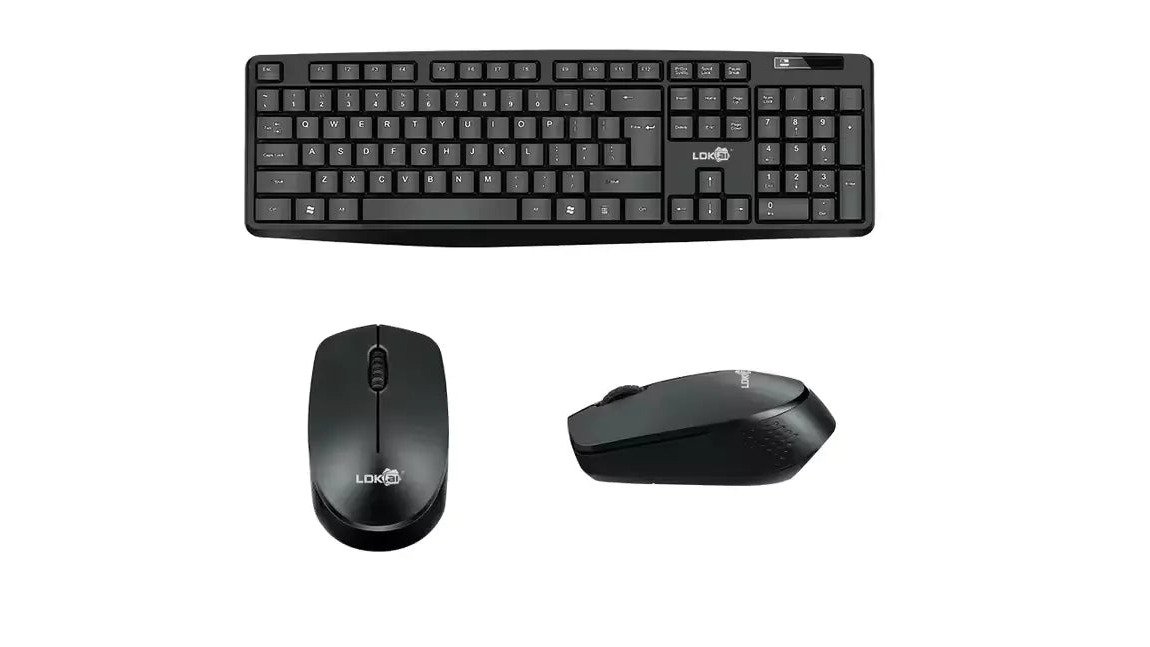
The bundled mouse has an ergonomic shape. Both devices run on batteries and connect through a single USB receiver, so there is no cable clutter.

It does not have a tenting or split layout.
Best for: home and office workers who type for hours and want quiet, low-effort keys. Skip if: you need a split or tented layout.
Check the Lokai GR-70 price and buy it here.
2. KB-6600 Wireless Keyboard Mouse Set: Best Budget Option for Wrist Pain Relief
At £18.99, the KB-6600 is the cheapest way to get a matched keyboard and mouse with an ergonomic design.
The waterproof design is a genuine bonus for desks where drinks live.
A budget board can be a lower-cost way to try an ergonomic layout.
Best for: first-time buyers testing whether an ergonomic layout helps. Skip if: you have a narrow desk or want a compact footprint.
See the KB-6600 set and buy it here.

3. Yesido KB27 Two-Fold Bluetooth Keyboard: Best Portable Split Ergonomic Keyboard
The Yesido KB27 at £27.99 folds in two for portability.
It pairs with Windows, macOS and iOS, runs about 45 hours per charge and charges over USB-C. It has a premium metallic UV finish and convenient shortcut keys.
Best for: remote workers and travellers who want adjustable forearm alignment on the move. Skip if: you type at high speed all day and want full-size keys.
View the Yesido KB27 and buy it here.

4. RK61 61-Key Mechanical Keyboard: Best for Programmers and Multi-Device Users
Programmers get the most from the RK61 at £50.99.
The tea shaft switches are mechanical switches.
KB-6600 2.4Ghz Office Waterproof Wireless Keyboard Mouse Set →
The catch is the learning curve. Losing the number pad and arrow cluster means relearning shortcuts. Give it two weeks before you judge it.
Best for: developers and multi-device users who want a compact mechanical board. Skip if: you rely on a number pad daily.
Check RK61 specs and buy it here.
5. YINDIAO Mechanical Gaming Keyboard: Best Full-Size Mechanical Feel
The YINDIAO at £38.99 is the pick for anyone who wants a full 104-key mechanical board with an ergonomic layout.
It is wired over USB, draws 180mA and measures 448 by 178 by 38mm.
The board is 38mm tall, which is taller than a low-profile board.
Best for: desk workers who want mechanical feedback and a full layout. Skip if: you want a slim, low-profile board.
6. iMICE AK-400 and MC Saite MC-8017: Budget Wired Alternatives
Two wired boards cover the tightest budgets. The iMICE AK-400 at £22.99 offers 104 keys, a frosted metal panel and laser-engraved keycaps, with a 135cm cable. The MC Saite MC-8017 at £20.99 is a 78-key mini board weighing 240g.
Both are plug-and-play over USB and need no charging.
Neither offers wireless freedom or adjustable tenting.
Best for: buyers who want a reliable wired board under £25. Skip if: you need wireless or a split layout.
Getting Your Ergonomic Keyboard Setup Right
A keyboard works best as part of a well-arranged desk. The aim: elbows near 90 degrees, forearms parallel to the floor, wrists straight and shoulders relaxed. How you get there depends on your body, your typing style and your board, so this section gives you a staged plan rather than a one-size-fits-all checklist.
Step 1: Set the chair and desk height first
Raise or lower your chair so your elbows are level with the keys when your upper arms hang relaxed. If your desk is fixed and your chair cannot go high enough, a footrest can stop your legs dangling. Most practitioners find elbows slightly below shoulder height more comfortable than elbows forced above desk level.
Step 2: Position the keyboard for your shoulder width
A common pattern is to place the keyboard too far away, which pushes the shoulders forward and rounds the upper back. Bring the board close enough that your upper arms stay vertical. For a standard one-piece board, the centre of the keyboard should line up with the centre of your body, not the edge of the desk.
Step 3: Match the wrist rest to the board height
Add a wrist rest only if your hands hover above the keys. A rest should support the heel of your hand during pauses, not press into your wrist while you type. Match the rest height to the front edge of the keyboard: a thick rest under a low-profile board pushes your hands upward and undoes the benefit.
Step 4: Keep the mouse within easy reach
A compact keyboard shortens the reach to your mouse, which reduces shoulder and wrist strain. Put the mouse on the same surface as the keyboard, close to the board, and avoid stretching across a number pad. If you use a wrist rest mouse pad, check that it does not raise your hand so high that your wrist bends upward.
Step 5: Adjust the monitor and take breaks
Set the top of the screen roughly at eye level so you are not craning your neck (Working safely with display screen equipment). Stand up and move every 30 to 45 minutes; short, frequent breaks are easier to sustain than one long pause. A keyboard is a comfort tool, not a cure, so pair it with movement and posture changes.
A staged transition plan for a new keyboard
A new layout can feel unfamiliar at first. Give yourself two weeks before judging it. Start with 20 to 30 minutes of use on the first day and add 15 to 20 minutes each day. Keep your old keyboard nearby for high-speed tasks until the new one feels natural. Touch typists moving to a compact or split board should practise short, low-stakes typing sessions rather than jumping straight into deadline work.
Frequently Asked Questions
Can an ergonomic keyboard help with wrist pain?
It can help, but not on its own. The practical takeaway is that a keyboard which keeps your wrists straight and your forearms level removes a common source of strain, but you should pair it with correct desk height and regular breaks.
Are split keyboards better for wrist pain?
A split ergonomic keyboard lets each hand sit at shoulder width, which reduces the outward wrist bend a standard board forces. If you travel or work across devices, a folding model such as the Yesido KB27 is designed for portability.
Should your wrists rest on the desk while typing?
No. Resting your wrists on the desk or a hard edge while typing compresses the tissue at the base of the hand and encourages wrist bending. Your forearms should be roughly level with the keyboard, with hands floating above the keys. A keyboard wrist rest is for pauses between bursts of typing, not for support during keystrokes. If you use one, choose a padded cloth and rubber design and keep it in front of the keyboard, not under your palms mid-type.
How long does it take to get used to an ergonomic keyboard?
Adjusting usually takes some days of regular use. Split and compact layouts take longer than a standard full-size board because key positions shift. Start with short sessions and build up, rather than switching for a full eight-hour day immediately. Keep your old keyboard nearby for deadline days during the first fortnight. If wrist pain worsens rather than settles after two weeks, stop and speak to a GP or physiotherapist.
When should I seek advice about persistent wrist pain?
See a GP if pain lasts more than two weeks, wakes you at night, or comes with numbness, tingling or weakness in the fingers. Those symptoms can point to carpal tunnel syndrome or another repetitive strain injury that needs proper assessment. A keyboard change supports recovery but does not diagnose or treat a condition. In the UK, your GP can refer you to a physiotherapist or a hand specialist if needed.
Wrist pain rarely disappears with one purchase. It fades when your whole setup stops fighting your body, and that takes the right board plus a few small changes. At Metanoia media, we stock quiet wireless combos, a foldable Bluetooth board and budget wired options, all priced clearly so you can start without a big spend. Browse the range and pick the keyboard that matches how you actually work.
