

Best Way to Organize Home Office: Desk, Files & Cables

Table of Contents
- Why the Best Way to Organize a Home Office Starts With a Clear-Out
- How to Declutter a Home Office Without Losing Track of Anything
- Home Office Desk Organisation: What Earns a Place on the Surface
- Taming Paperwork, Files and Your Digital Inbox
- Small Home Office Organisation: Making Every Centimetre Work
- Cable, Charger and Electronics Storage That Stays Neat
- Home Office Organisation for ADHD: Systems That Survive a Bad Week
- Ergonomics, Maintenance and Keeping the Workspace Tidy
- Frequently Asked Questions
Last Updated: October 8, 2026
Why the Best Way to Organize a Home Office Starts With a Clear-Out
The best way to organize home office space is to remove everything first, sort it into keep, relocate and release piles, then rebuild around what you actually use. At Metanoia media, storage is rarely the problem, accumulation is.
A clear-out resets the room before you buy a single tray or box. Most people organize around the mess, which just gives clutter a tidier home.
How to Declutter a Home Office Without Losing Track of Anything
Decluttering fails when you handle the same object three times. The fix is a fixed sorting station and a rule for every item.
Set up four boxes: Keep, Relocate, Donate or Recycle, and Bin. Every item goes into one on first touch, and nothing returns to the desk until the sort is finished.
Loose documents are hardest to release, so give them their own pass rather than mixing them with stationery.
The 10-10-10 Rule and a Two-Box Staging Area
The 10-10-10 rule is time-boxed: ten minutes on one surface, ten on one drawer, ten on one box of paperwork. It caps the decision fatigue that stops most people mid-sort.
A two-box staging area handles the "maybe" items. Box one is dated and sealed for ninety days; if you have not opened it by then, it leaves the house unopened.
Home Office Desk Organisation: What Earns a Place on the Surface
A desk surface should hold only what you touch during a working day. Everything else moves to a drawer, shelf or file box.

The test is simple: if you have not used an object in the last week, it does not live on the desk. Chargers, notebooks, a lamp and your current project earn their place; ornaments, spare stationery and old post do not.
Our Desktop Drawer Storage Box at £13.99 handles the small-item problem well.

Trays, Drawers and a Home for Every Small Item
Small items cause disproportionate mess; a home for every one is the only durable fix.
- Top drawer: pens, sticky notes, a charger, the things you reach for daily
- Second drawer: refills, spare cables, batteries
- Desk tray: current project only, cleared weekly
Group small items by task, not type. A "charging" tray beats a "cables" drawer because it matches how you work.
Taming Paperwork, Files and Your Digital Inbox
Paperwork needs a three-tier system: action, reference and archive. Anything that fits none of them should be scanned and shredded.
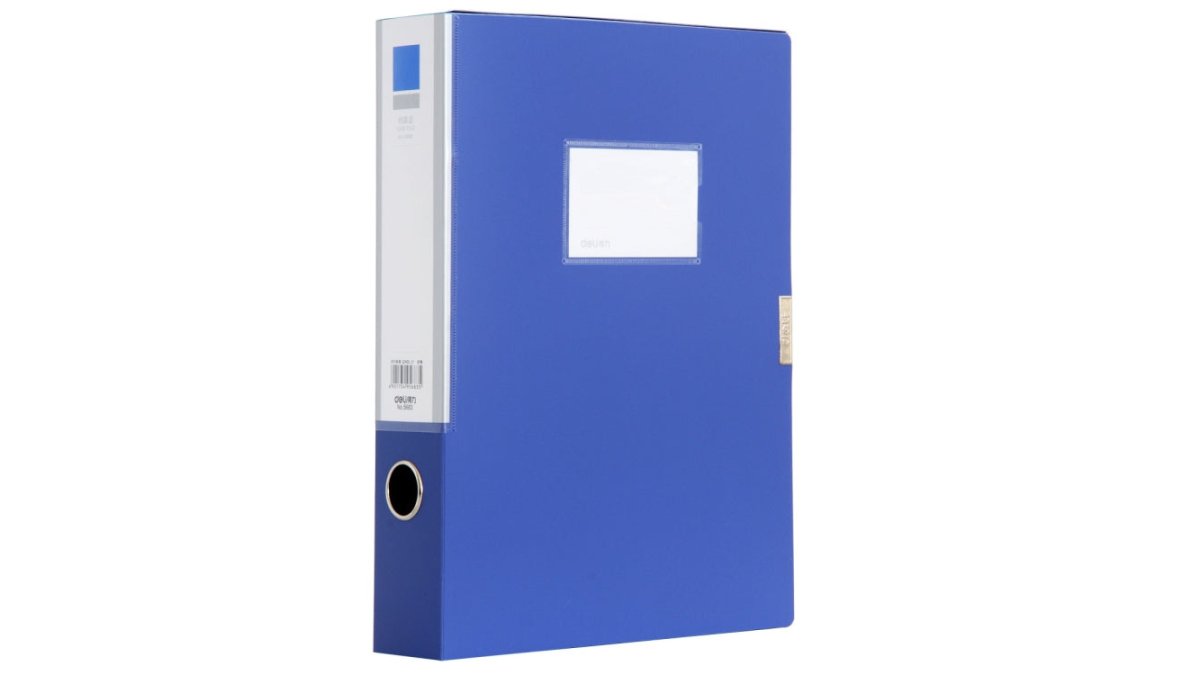
For action papers, keep a single tray. Our Deli 5683 File Box at £4.99 takes A4 documents at 31.8 x 23.6 x 5.5 cm, and its side label pulls out for relabelling without dismantling the box.
Apply the same three tiers to your inbox and desktop folders. Mirroring a working physical system on screen removes the mental switching cost.
| Tier | Physical Home | Digital Equivalent | Review Cycle |
|---|---|---|---|
| Action | Single desk tray | Inbox, starred | Daily |
| Reference | Labelled file box | Named project folder | Monthly |
| Archive | Scanned and shredded | Cloud archive folder | Yearly |
Small Home Office Organisation: Making Every Centimetre Work
Small rooms reward vertical thinking: wall space, door backs and the area above the desk hold storage that floor space cannot.
Shelving above the desk is the highest-return change in a compact room: a single shelf at 40-50 cm clears the desktop without crowding your eyeline.
Choose storage that fits the gap you have, not the gap you wish you had. Measure first, then buy.
Shared Desks and Multi-Use Rooms
A shared desk needs personal storage that travels. Give each user a labelled box or drawer insert they can lift out at the end of a session.
In a multi-use room, define the office zone with a rug or shelving unit rather than a wall. When the laptop closes, the room stops being an office.
Cable, Charger and Electronics Storage That Stays Neat
Cables stay neat when each has a labelled home and a single charging point serves the desk.
Start by removing duplicates, most desks carry three or four cables for devices that no longer exist.
Our HAWEEL Electronic Organizer at £6.99 gives every cable a place.

For the desk itself, a single LDNIO charging socket at £28.99 replaces a tangle of adaptors.
Home Office Organisation for ADHD: Systems That Survive a Bad Week
Systems for ADHD need to survive the weeks when you do not maintain them: fewer steps, visible storage, no reliance on memory.
Desktop Drawer Storage Box Cosmetics Office Student Stationery Pen Dormitory →
Most organisation advice assumes a person who tidies daily. That assumption is the failure point. A system built for a bad week looks different from one built for a good week, and the difference is measurable in steps, not willpower.
The Step-Count Test
Count the actions between you and putting something away. A lidded box on a high shelf is four steps; an open tray at desk height is one. Every extra step is a point where the item gets abandoned on the surface.
Apply the test to your five most-used items. If any takes more than two steps to put away, the storage is in the wrong place, not the wrong size.
Visible Beats Hidden, Open Beats Lidded
Clear containers beat opaque ones because you can see what you have. Open trays beat lidded boxes because they remove a step. Labels beat both, ending the "where does this go" pause that derails a tidy-up.
A practical setup that survives a bad week:
- One open landing tray at the desk edge for anything that arrives without a home
- One clear lidded box for cables and chargers, kept at arm's reach rather than in a cupboard
- One labelled donation bag on the floor beside the desk, not in another room
Design for the Worst Week
The aim is a system that degrades gracefully. If a bad week leaves three items on the desk, the room should still function. Design for the worst week, not the best one.
A common pattern is the "reset anchor": one visible cue that triggers a five-minute tidy, like closing the laptop lid or switching off the desk lamp. The anchor matters more than the duration because it removes the decision of when to start.
- Keep one "landing tray" for anything that arrives without a home
- Reset for five minutes at the end of each working day
- Store duplicates, not backups, and cap the number of spares
Ergonomics, Maintenance and Keeping the Workspace Tidy
When you organize home office space, it only stays tidy if the layout supports how you work. Ergonomics and maintenance are the same project: a desk that hurts to use gets abandoned, and an abandoned desk collects clutter.
Most guides stop at tidiness, missing that comfort drives maintenance. If reaching for a file twists your shoulder, you stop filing; if the monitor sits too low, you pile books under it and the surface fills up.
Setting Up the Workstation
Work through the setup in this order, because each step depends on the one before it.
- Chair height first. Set the seat so your feet rest flat and your thighs are roughly level. If the chair will not go low enough, use a footrest rather than lowering the desk.
- Desk height second. Your forearms should sit roughly level with the work surface, elbows near a right angle. If the desk is fixed and too high, a keyboard tray or a footrest closes the gap.
- Monitor third. Place it about an arm's length away, with the top of the screen near eye level. A stack of books under the stand is a legitimate fix, but it eats desk depth, so a monitor arm or a riser with drawer space underneath is the tidier answer.
- Keyboard and mouse last. Keep them close enough that your elbows stay near your sides rather than reaching forward.
- Lighting throughout. Aim for light that falls on the work surface without reflecting off the screen. A lamp with an adjustable head lets you move the light rather than move the desk.
The [Health and Safety Executive's workstation guidance | hse.gov.uk] covers display screen equipment setup and is worth reading if you work from home regularly.
A foldable LED desk lamp at £16.99 helps here: its double head adjusts across the work surface, and the 3200mAh battery means it works away from a socket.
Storage That Follows the Reach Zones
Ergonomics and organisation meet at reach. Divide the desk into three zones and assign storage accordingly.
| Zone | Distance | What Belongs There |
|---|---|---|
| Primary | Within forearm reach | Daily tools, current project, pen tray |
| Secondary | One arm's length | Reference files, charger, notebook |
| Tertiary | Beyond arm's length | Archive boxes, spares, seasonal items |
If something in the tertiary zone is used daily, it is in the wrong zone. Moving it is faster than reorganising the whole desk.
For paperwork you handle often, a laminating machine at £48.99 protects reference sheets and certificates so they survive daily use.
Maintenance as a Routine, Not a Mood
Maintenance is a routine, not a mood: ten minutes on Friday, one drawer a month, and a seasonal clear-out keep the room stable.
| Routine | Frequency | Time | What It Covers |
|---|---|---|---|
| Surface reset | Daily | 5 minutes | Desk, tray, cables |
| Drawer sweep | Weekly | 10 minutes | One drawer, one bin bag |
| Digital sort | Monthly | 20 minutes | Inbox, downloads, desktop |
| Full clear-out | Quarterly | 2 hours | Staging area, donation run |
Measuring Whether the System Works
A tidy room is not proof the system works. Two measures tell you more.
- Reset time: how long it takes to return the desk to a usable state. If it is under two minutes, the system is holding. If it is creeping past five, something has drifted out of its zone.
- Search time: how long it takes to find a document or cable you need. If you are regularly hunting, the labelling or the zone assignment has failed, not your memory.
Track both informally for a month. If neither improves, the problem is layout, not storage, move things rather than buy more containers.
Frequently Asked Questions
How can I make my home office more organized?
Start by clearing the desk completely, then sort everything into keep, donate, recycle and relocate piles. Give frequently used items a permanent home within arm's reach, such as a compact drawer box for pens and small stationery. File paperwork into labelled A4 boxes, group charging gear into one cable organiser, and finish by wiping the surface. The whole routine takes about an hour and gives you a workspace that is easier to keep tidy.
What is the 10-10-10 rule for decluttering?
The 10-10-10 rule asks you to find ten items to throw away, ten to donate and ten to return to their proper place. It works well in a home office because the categories cover most clutter: dead pens and old receipts go in the bin, duplicate chargers and unused stationery go to charity, and stray mugs and books go back where they belong. Repeat the cycle once a week and clutter stops building up.
How can I organise a home office in a small space?
Use vertical space first: wall shelves, hooks and clipboards keep the desk clear. Choose furniture that stacks or folds, and pick storage that fits the gap you actually have, such as a slim A4 file box that is 55 mm deep. Keep only daily items on the desk, store the rest in labelled boxes, and run cables along the wall rather than across the floor so the room feels larger and safer.
How do people with ADHD get organized?
The systems that work best are visible, low-effort and forgiving. Use open trays and clear containers so items are not out of sight, label everything so decisions are quick, and keep a single landing zone for keys, post and chargers. Set a five-minute tidy at the same time each day rather than a long weekly session, and accept that the system will need resetting. Simple beats perfect when your attention shifts often.
What should I keep on my home office desk?
Keep only what you use most days: your laptop or monitor, keyboard and mouse, a lamp, a charging point and one small container for pens and notes. Everything else, including spare stationery, chargers and archived paperwork, belongs in a drawer, file box or storage bag. If you have not reached for an item in a week, move it off the surface. A clear desk makes the workspace feel calmer and reduces time spent hunting for things.
How do I keep my home office tidy every day?
End each working day with a two-minute reset: close documents, put pens and cables back in their containers, and drop anything that needs action into one tray. Once a week, empty the tray and deal with each item. Once a month, check drawers and boxes for anything you no longer need. This layered routine keeps the workspace tidy without a big clear-out every few months.
Clutter builds faster than any single tidy-up can clear it, which is why the routine matters more than the clear-out. Metanoia media stocks the practical pieces that make those routines stick, from desktop drawer storage and A4 file boxes to cable organisers and charging sockets, all at prices that suit a home setup. Browse the range and build a workspace that stays organised past the first week. View all.